
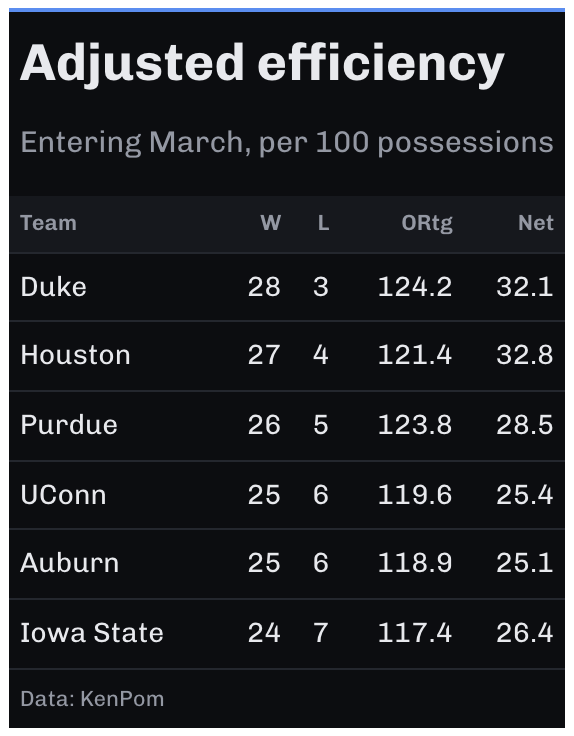
A restrained dark theme. The background is a near-black instead of pure black, which avoids the smearing pure black causes on OLED screens. Column labels sit on a slightly raised band, rules are hairlines, and the body has no fills.
Usage
gt_theme_midnight(
  gt_object,
  accent = "#5B8DEF",
  density = c("comfortable", "compact", "social"),
  ...
)
Arguments
- gt_object
A
gttable object to modify.- accent
Character. A hex color for the row-group labels and the rule above the table. Defaults to
"#5B8DEF".- density
Character. The type and padding scale. One of
"comfortable","compact", or"social". See Density. Defaults to"comfortable".- ...
Additional arguments passed to
gt::tab_options, applied last so they override anything the theme sets.
Details
Light text on a dark background reads as lighter weight than it is, so the theme opens up the line height to compensate.
Color scales on dark grounds
A green-to-red ramp built for white paper goes muddy on a near-black
background, as its mid-tones collapse toward the background. Use pal_midnight
with gt_color_ranks() instead.
Density
density sets the type and padding scale together. "comfortable" uses a
14px body with roomy rows, "compact" a 12px body with tight rows, and
"social" a 17px body with generous rows and a larger title, at the scale
gt_save_crop() and gt_social_crop() export at.
See also
pal_midnight for a color scale that survives a dark ground, and
gt_theme_terminal() for a denser dark look.